Menubar, Toolbar and Ribbon is Not Being Loaded in WiseImage for AutoCAD
Sometimes it may happen that Menubar, Toolbar and Ribbon is not being loaded in WiseImage for AutoCAD due to some system errors or installation error. Here, I will try to describe a common scenario for WiseImage Pro 16.0 for AutoCAD 2014. The solution is similar to other versions of WIAC (16/17/18/19) with other versions of AutoCAD (2016, 2014, 2017, 2018, 2019). Please read the instructions to fix such issues on your system. Note: You should be aware of WiseImage supported Autodesk AutoCAD platforms. I. Launch WiseImage Pro 16.0 for AutoCAD 2014 II. Use “Menuload” command III. Unload the WISEIMAGEPRO item
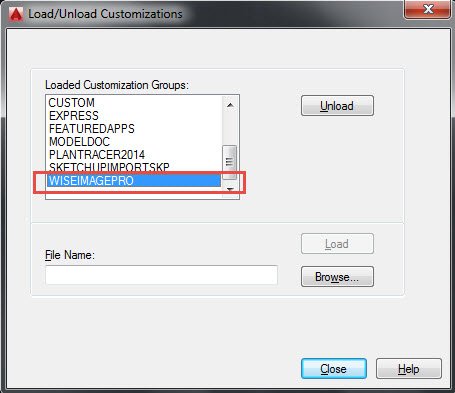
IV. Then Browse the menu (ribbon_pro.cuix) item again from the C:\Program Files\CSoft\WiseImageAC Pro 14.0\AC2014\menu
And load it to AutoCAD and close it.
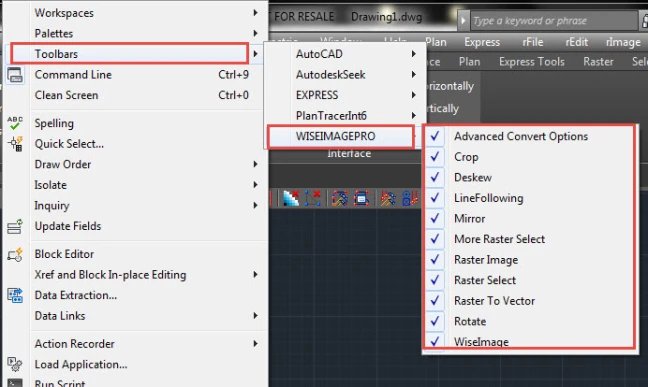
V. If the toolbar still not appears, then go to “Tools” from the menu bar of AutoCAD and then click on toolbar and
Then go to WISEIMAGEPRO option for the toolbars.
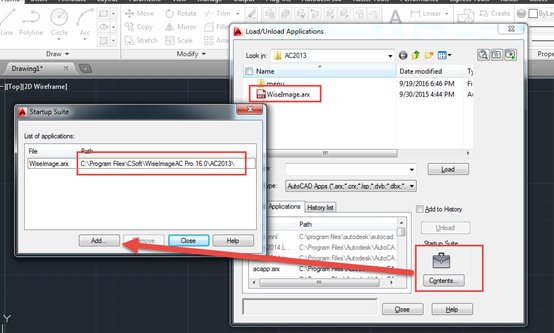
VI. Use “APPLOAD” command and go to the “Contents” option and “Add” the WiseIamge.arx file from C:\Program Files\CSoft\WiseImageAC Pro 16.0\AC2013 and close it.
What's Your Reaction?